How to Reduce Screen Time: What Works and What Doesn't
80% of smartphone users have made rules for themselves about using their phone less. Only 12% use the tools their phone provides to enforce those rules. The other 68% made a promise to themselves and broke it. The shape of the problem — average daily screen time creeping past 5 hours — keeps getting worse.
If you’re reading this, you’ve probably tried reducing your screen time before. Maybe several times. Here’s a guide that skips the parts you’ve already tried and focuses on the approaches that survive longer than a week.
The approaches ranked by evidence
Ordered from most to least effective, based on the research.
1. Environmental change (most effective, least popular)
Put your phone in a different room. Charge it in the kitchen. Leave it in the car during dinner. Buy a $10 alarm clock so it doesn’t need to be next to your bed.
This is the most effective intervention because it eliminates the decision entirely. You can’t scroll something that’s in another room. The impulse to check fires and fizzles because there’s nothing to grab. By the time you walk to the kitchen, the impulse has passed.
A 2025 randomized controlled trial that produced measurable improvements in well-being, depression, sleep, and stress used physical separation as a core component. The participants who reduced screen time the most were the ones who changed where their phone lived, not what apps they installed.
Why most people don’t do this: it feels extreme. “I might need my phone” is the rationalization. You won’t need it. You’ll be fine. The feeling that you need your phone within arm’s reach at all times is itself a symptom of phone addiction.
2. Friction apps (moderate effectiveness, moderate adoption)
ScreenZen (free) and One Sec (free for 1 app) add a pause before opening distracting apps. The pause interrupts the autopilot that starts most scrolling sessions. One Sec reports a 57% reduction in app opens.
These are the best compromise between effectiveness and ease. They don’t require moving your phone. They don’t require willpower in the moment. They just add 5 seconds of conscious thought before the scroll starts.
The catch: friction fades over weeks. The pause becomes routine. If you’re still using the same friction app after a month, the effect has likely diminished. Rotating between ScreenZen and One Sec (or changing One Sec’s intervention type weekly) extends the effectiveness.
3. App blockers (variable effectiveness, high adoption)
AppBlock ($30/yr) and Freedom ($40/yr) prevent access to specific apps during scheduled times. Strict Mode in AppBlock makes the block hard to bypass during a session. The wider survey of apps to manage screen time covers which ones survive past month one.
Blockers work for structured situations: blocking social media during work hours, blocking everything during sleep hours. They fail for unstructured time (evenings, weekends) because you control the blocker and can disable it when the craving hits.
Only 12% of people sustain use of their phone’s built-in blocking features. Third-party blockers with Strict Mode have better retention, but the data on long-term adoption is thin.
4. Visual deterrence (emerging approach)
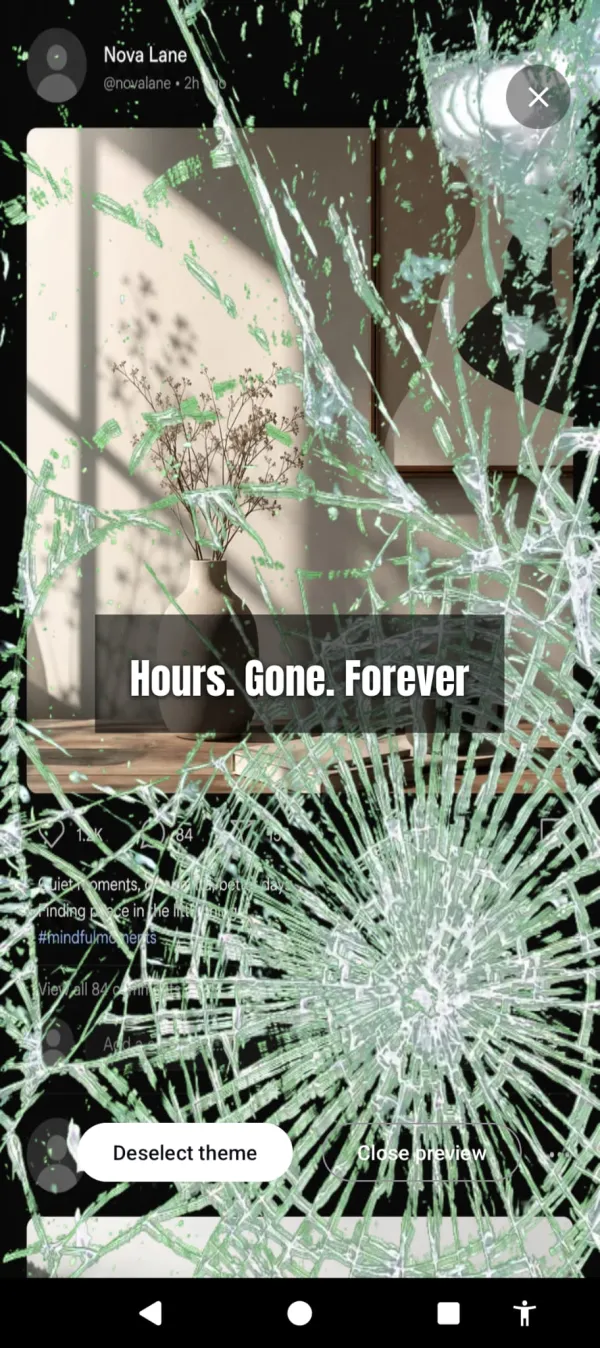
Cursed Screen makes your phone’s screen progressively ugly the longer you use it. Flames, crawling bugs, glass cracking at the edges. Nothing blocked. The phone just gets worse.
Minute 30 of a scroll you didn’t plan. The feed still works. It just looks like this.
This is newer than blocking or friction, so there’s less long-term data. The mechanism is different from everything above: instead of preventing use or interrupting it, it changes the sensory experience of sustained use. You reduce screen time not because a rule told you to but because the phone becomes unpleasant.
There’s nothing to adapt to the way you adapt to friction, and nothing to disable the way you disable a blocker. The overlay changes with intensity and time, so the experience at minute 30 is different from minute 10. Your brain doesn’t normalize a moving target the way it normalizes a static one.
Dread isn’t the only lever, either. A positive mode trades the fire for flashes of aurora and golden sunlight, and a streak counts every day you stay under your limit — you pick negative, positive, or a mix.
5. Gamification (limited effectiveness)
Forest rewards you for not using your phone during timed sessions. Plant a virtual tree. Don’t touch the phone or it dies. Earn coins for real tree planting.
Works well for structured focus periods (studying, work sprints). Doesn’t do anything about the 3 hours of unstructured scrolling between sessions. The novelty of the gamification wears off within a few months for most users.
6. Screen time limits (least effective)
Digital Wellbeing app timers. Set a limit. Get a notification. Tap “ignore.” Repeat.
Included here for completeness. The data says they don’t work for most people. The design asks for willpower at the moment willpower is lowest. The full autopsy is in our piece on why screen time limits fail. Move on.
The 3-week mark
A 2025 RCT found that screen time reduction produces measurable mental health improvements, but only after sustained effort. The sweet spot is three weeks. Not three days. Not a weekend detox. Three weeks of consistently reduced usage.
Most people quit their screen time reduction attempt within the first week because the discomfort feels like failure. It’s not failure. It’s recalibration. Your brain adapted to 300 short-form videos a day. Pulling that back produces restlessness, boredom, and irritability. These are withdrawal symptoms, and they peak around day 3-5 before declining.
If you can get through the first week, the second week is noticeably easier. By the third week, the lower usage feels normal instead of restricted.
The practical plan
Week 1: Pick one approach from levels 1-4 above. Just one. Don’t combine three tools and a new morning routine. One change.
Week 2: Check your screen time tracker. Compare weekly average to the week before you started. If social media time is down by 20%+ the approach is working. If it’s unchanged, the approach isn’t working for you and you should switch to a different one from the list.
Week 3: Maintain. Don’t add more tools. Don’t tighten restrictions. Just hold the change. Your brain is recalibrating. Let it.
Week 4+: The new baseline should feel normal. If it does, consider adding a second intervention (e.g., friction app + phone in kitchen at night). If the old habits are creeping back, your approach has started fading and you need to swap to a different one. The deeper version of this practice — choosing tech on purpose, layer by layer — is digital minimalism.
The number to watch
Don’t watch total screen time. Watch unintentional screen time. The sessions that started as “checking one thing” and turned into 40 minutes. That’s the number that matters.
Your phone’s screen time tracker shows per-app usage. The apps where your average session length is over 10 minutes are the problem apps. Short sessions (under 2 minutes) for messaging, maps, and calendar are fine. Long sessions for social media and video are the target.
Reduce the long sessions. The total follows.
Cursed Screen has a free trial on Android. Subscribe monthly or annually, or pay once for lifetime access. It targets exactly those long sessions: the overlay only appears after your grace period, and it gets worse the longer the session continues. Short functional use stays clean. Long compulsive use gets ugly.
The phone isn’t going to reduce your screen time for you. But something on your phone can make you want to.
Want a tool that does this automatically?
Cursed Screen makes your phone progressively uglier the longer you use it. No blocking, no willpower needed — you'll want to put it down.
Get Cursed Screen on Google Play