Instagram Addiction: Reels Are Eating Your Life
Instagram isn’t a photo app anymore. Reels make up over 50% of time users spend on Instagram. The photo feed, Stories, DMs — they’re side features now. Reels is the main event. And Reels is TikTok with a different logo.
You open Instagram to check a DM. The Reels tab is right there. You tap one. Twenty minutes later, you’ve forgotten the DM. You’ve watched 40 videos you didn’t choose, about topics you don’t care about, created by people you’ve never heard of. The algorithm chose all of it. You just swiped. That gap between intention and behavior is the defining experience of doomscrolling.
Why Instagram specifically hooks you
Instagram addiction hits differently from TikTok or YouTube because of the social layer.
Your friends are on Instagram. Your family posts there. Event invites, birthday stories, group chat memes — they all live in the Instagram ecosystem. You can’t delete Instagram without losing access to a social network that’s intertwined with your real-world relationships.
That’s what makes Instagram addiction so sticky. You can delete TikTok and only lose entertainment. Deleting Instagram means missing your friend’s engagement photos, your cousin’s baby updates, the group chat planning your birthday dinner. The social cost of leaving is real, and Instagram knows it. The social features keep you on the platform. The Reels keep you scrolling once you’re there. This entanglement is what makes social media addiction harder to break than other dependencies — the addictive part is fused with the functional part.
Instagram also triggers comparison in a way other platforms don’t. The curated lives, the highlight reels, the vacation photos — they generate envy and inadequacy even when you know they’re filtered. That emotional discomfort ironically keeps you scrolling, because the same app that makes you feel bad is the one you turn to when you feel bad.
The comparison loop is vicious. You feel bad about your life. You open Instagram. Other people’s lives look better. You feel worse. You keep scrolling because the scroll numbs the feeling. An hour passes. You close the app feeling emptier than when you opened it. Tomorrow you’ll do the same thing.
Young adults using phones 5+ hours daily show a 21% higher rate of depressive symptoms than those under 2 hours. For users under 30, Instagram is doing a lot of that work. This is the mental health cost baked into phone addiction more broadly — the platform amplifying the underlying loop.
What doesn’t work
Unfollowing accounts helps with the feed but doesn’t touch Reels. The Reels tab serves algorithmic content from accounts you’ve never seen. Curating your follows is worthwhile but doesn’t address the main time sink.
Setting Instagram to “quiet mode” mutes notifications and auto-replies to DMs. Reduces interruptions, doesn’t reduce the 20-minute scroll you initiated yourself.
Using the “time limit” reminder inside Instagram. A notification tells you you’ve spent 30 minutes on the app. You dismiss it. It’s designed to be dismissed. Meta isn’t going to build a tool that actually reduces your time on their platform.
What works
Use Instagram in a browser. The mobile website doesn’t push Reels as aggressively. DMs work. The feed works. Reels are accessible but not shoved in your face. It’s slower and less polished, which is the point.
Remove Reels from your experience. Tap “Not Interested” on every Reel that appears in your feed. Long-press, select the option. Do this aggressively for a week. The algorithm will de-prioritize Reels in your feed (not in the dedicated Reels tab, but in the main feed). This reduces passive Reel exposure.
Block Instagram during vulnerable hours. AppBlock can block Instagram from 9pm to 7am while keeping it accessible during the day for messaging. Use Strict Mode to prevent disabling the block.
Add friction. ScreenZen (free) or One Sec add a pause before Instagram opens. The 5-second interruption stops the autopilot. You still open it for intentional use. You stop opening it 15 times a day out of habit.
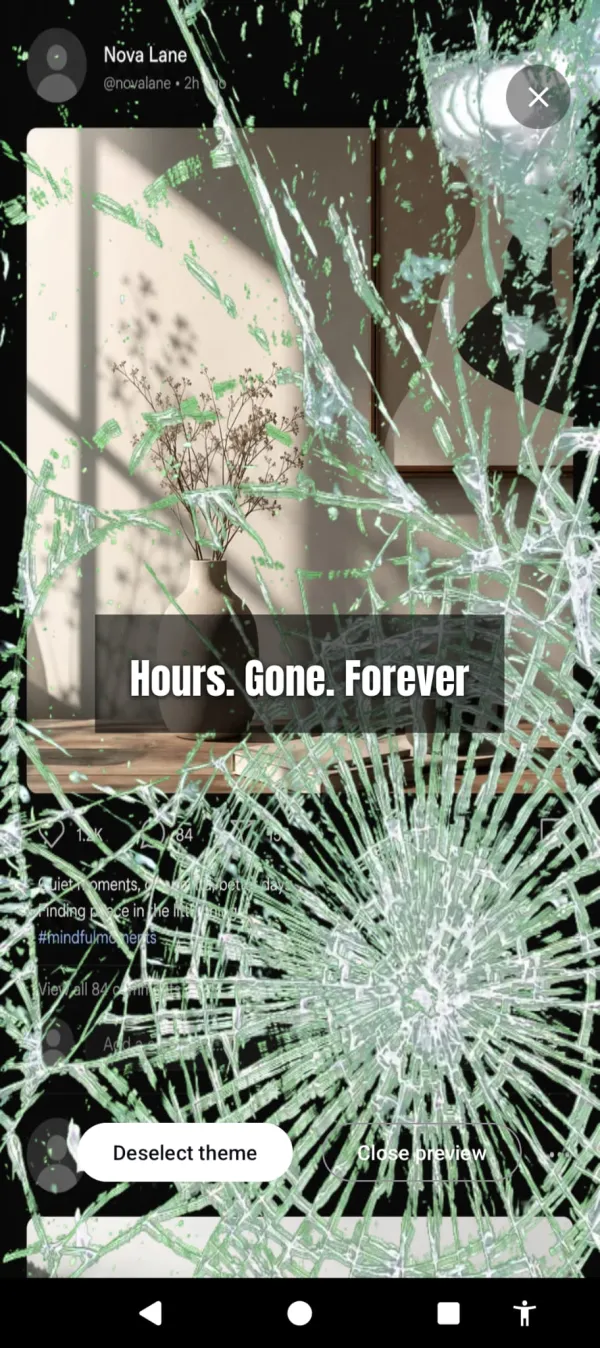
Make the Reels scroll ugly. Cursed Screen doesn’t block Instagram. It makes your phone’s screen progressively worse the longer you use it. The DM you came to check? That happens in 30 seconds, well within the grace period. The 20-minute Reels binge that follows? That’s when hellfire starts creeping across the edges. Bugs crawling over the feed. Glass cracking over the perfectly filtered content.
Instagram still works. Reels still play. But the experience of extended scrolling degrades until it feels wrong. The algorithm can serve the most engaging Reel it has. Watching it through a screen covered in visual decay changes the equation.
The DM took thirty seconds. The Reels binge is where the glass starts cracking.
Session-based tracking means closing Instagram and doing something else immediately starts improving the overlay. Three minutes off forgives one minute on. The phone rewards you for stopping.
The Instagram exit strategy
You don’t need to leave Instagram. You need to use it differently.
Intentional use: check DMs, respond to stories, post your own content. This takes 5-10 minutes and stays well within any grace period.
Unintentional use: the Reels tab, the Explore page, the infinite scroll through algorithmic content. This is the part that eats 20-90 minutes without your choosing.
Build a system that allows the first and punishes the second. Friction before opening catches some unintentional sessions. Visual deterrence during scrolling catches the rest.
Cursed Screen has a free trial on Android. Subscribe monthly or annually, or pay once for lifetime access. Your Instagram feed doesn’t deserve a clean screen after the first 10 minutes. Let it earn one. For the wider tactical playbook on breaking the scroll loop, read how to stop doomscrolling.
Want a tool that does this automatically?
Cursed Screen makes your phone progressively uglier the longer you use it. No blocking, no willpower needed — you'll want to put it down.
Get Cursed Screen on Google Play