Best Social Media Blocker Apps in 2026 (Compared)
Disclosure: Cursed Screen is our product. Other apps evaluated from public data. Last reviewed: April 2026.
You want to block TikTok, Instagram, and YouTube from ruining your evening. You search for a social media blocker. You find 30 options. You install one. It works for a week. You disable it. You install a different one.
Here are the social media blockers that are actually worth your time, what each one does differently, and why the blocking approach has a ceiling that no app in this category can break through.
The social media blockers
ScreenZen — Best free option
Price: Free (forever, no ads) | Rating: 4.7 (25K) | Platforms: Android, iOS, Mac, Win
Doesn’t hard-block social media. Adds a pause before opening: a countdown timer, a daily open limit per app, and a “mindful prompt” asking if this is intentional. You can still open the app; you just have to wait and think first.
Good for: People who want to reduce social media without feeling locked out. The gentle approach works for casual overuse.
Breaks when: The pauses become automatic. After a few weeks, you tap through without reading. The friction disappears into routine.
AppBlock — Best strict blocker
Price: Freemium, $30/yr | Rating: 4.7 (200K) | Platforms: Android, iOS, Chrome
Hard blocks social media apps and websites during scheduled times. Strict Mode with PIN lock prevents disabling during a session. Can block by schedule, location, or Wi-Fi network. Supports 20+ browsers for website blocking.
Good for: People who need a hard wall during work or study hours. Strict Mode is genuinely hard to bypass.
Breaks when: You skip enabling Strict Mode on a tired evening. Or you block Instagram but migrate to YouTube. Or the scheduled block ends and you binge.
Freedom — Best cross-device blocker
Price: $40/yr or $199 lifetime | Rating: 4.1 (7K) | Platforms: Android, iOS, Mac, Win, Chrome, Linux
VPN-based blocking across all devices simultaneously. If you block Instagram on your phone, it’s also blocked on your laptop and tablet. Locked mode prevents session cancellation. Focus sounds from Brain.fm.
Good for: People who own multiple devices and cheat by switching to whichever isn’t blocked. Freedom closes that loophole.
Breaks when: The VPN conflicts with work VPNs. Or you find an unblocked device. Or the session ends and the binge begins. $40/year is also a lot for an app you might uninstall in a month.
One Sec — Best varied friction
Price: Free (1 app), Pro €15/yr | Rating: 4.6 (32K) | Platforms: Android, iOS, Mac, Win, Linux, browsers
Multiple intervention types: breathing exercises, math problems, follow-the-dot tasks, emotion tracking. The variety keeps the friction from becoming routine as quickly as a simple countdown.
Good for: People who’ve outgrown ScreenZen’s simpler friction. The rotating interventions stay effective longer.
Breaks when: Free tier is one app only (barely useful for social media blocker). Even varied friction eventually becomes routine. And like all pre-opening tools, it does nothing inside the app.
Cold Turkey Blocker — Strictest desktop option
Price: Free (basic), $39 lifetime | Platforms: Windows, Mac (not Android)
Mentioned because it comes up in social media blocker searches. Blocks websites and apps on desktop with an almost unbypassable lock. You literally cannot remove the block early — even Task Manager and Safe Mode won’t help.
Not for mobile. Desktop only. But if desktop social media is your problem, this is the strictest option available anywhere.
The blocking ceiling
Every social media blocker on this list hits the same ceiling: blocking doesn’t change the behavior. It redirects it.
Block TikTok → open Reels. Block Reels → open YouTube Shorts. Block all three → open Reddit. Block everything → browse the web. Unblock one app “just to check messages” → scroll for 40 minutes.
The blocker is fighting individual apps. The addiction is to the scroll itself, delivered through whatever app is currently unblocked. Per-app blocking is whack-a-mole against a compulsion that doesn’t care which app serves it.
There’s also the willpower paradox. Social media blockers require the most discipline exactly when discipline is lowest. You enable Strict Mode on Monday morning when you’re motivated. By Wednesday night, tired and bored, you “forget” to enable it. The sessions you need the blocker most are the sessions you don’t set it up for.
The approach that doesn’t block social media
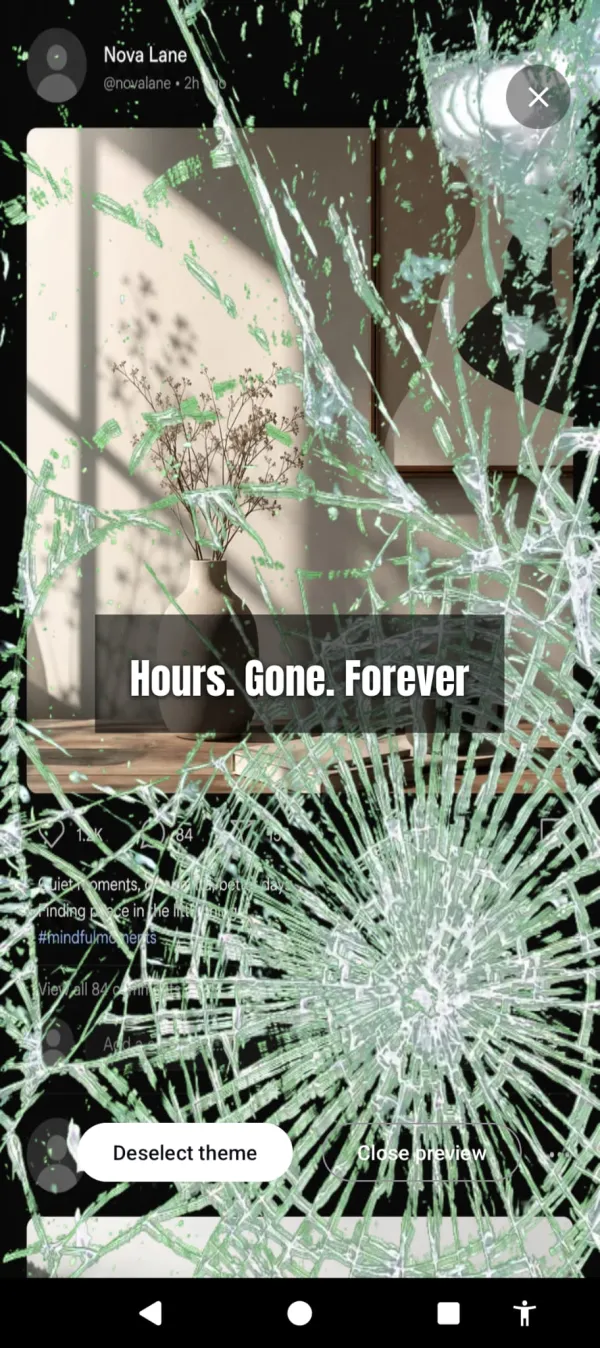
Cursed Screen takes a fundamentally different approach. It doesn’t block any social media app. It doesn’t add friction before opening one. Instead, it makes your phone’s screen progressively ugly the longer you use it — across all apps.
After a configurable grace period, animated overlays creep in from the edges. Flames. Cracking glass. Crawling insects. Open TikTok? The overlay is there. Switch to Instagram? Still there. Open Reddit? Still there. The overlay tracks total screen time, not individual apps. There’s no whack-a-mole because there’s no per-app blocking.
Open TikTok, then Instagram, then Reddit — the cracks follow you across every app.
The overlay gets worse over time. At minute 10 past grace, it’s subtle. At minute 30, it’s visible. At minute 60, your screen looks hostile. You don’t need willpower to stop doing something that looks and feels wrong. You don’t need to decide to stop. The experience pushes you out.
Nothing is blocked. You can still check messages, respond to DMs, use the functional parts of social media. The overlay doesn’t discriminate by app or content type. It discriminates by time. Quick use is clean. Marathon use is ugly.
For people who want encouragement instead of punishment, positive mode flashes aurora and sunlight with “the world misses you” between sessions. Same mechanism. Different emotional register.
Which one to try
| Your situation | Try this |
|---|---|
| Never tried a social media blocker | ScreenZen (free) |
| Tried friction, it faded | AppBlock Strict Mode ($30/yr) |
| Own multiple devices | Freedom ($40/yr) |
| Tried blockers, kept disabling them | Cursed Screen (free trial; subscribe or pay once for lifetime) |
| Desktop is the problem | Cold Turkey Blocker ($39 lifetime) |
Social media was designed to be addictive. A social media blocker is a band-aid on a product that was built to rip band-aids off. Pick the approach that matches how you fail, not how you hope you’ll succeed.
Reduce your screen time — without blocking anything
Cursed Screen makes your phone progressively uglier the longer you use it. No blocking, no willpower needed — you'll want to put it down.
Get Cursed Screen on Google Play